
Image to Prompt for Product Photos: A Three-Model Test
Follow a real perfume-photo example from reference image to extracted prompt, then compare Nano Banana 2, FLUX.2 Pro and Seedream 5 Lite results and a revision.
 Yix Team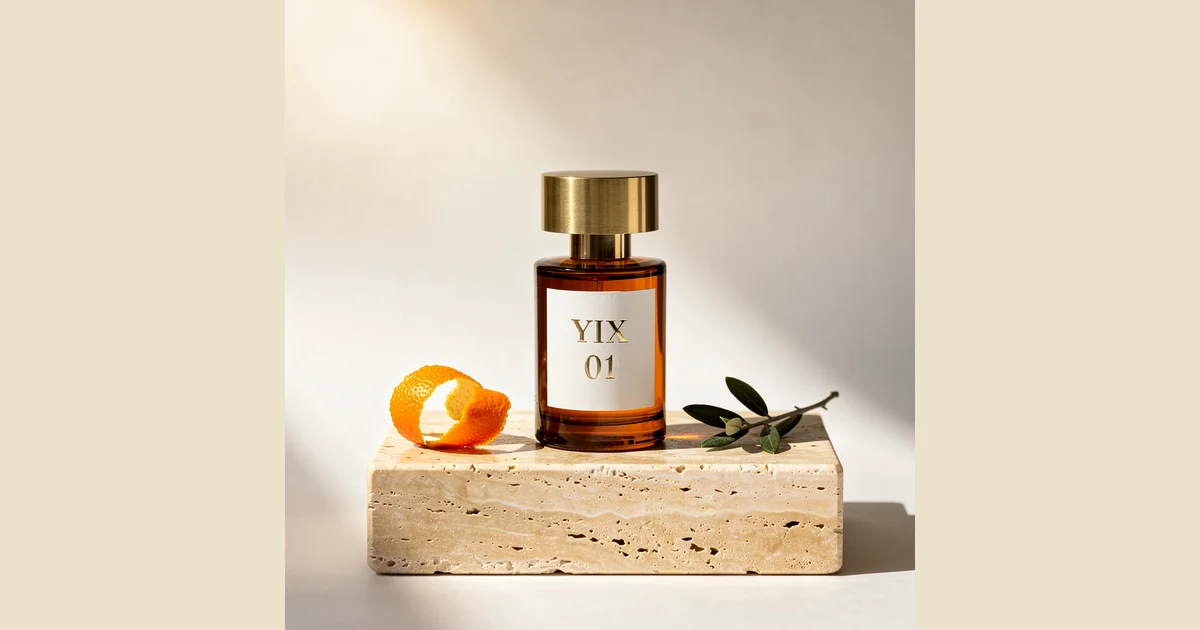
The reference looked simple: an amber perfume bottle, a pale stone slab, an orange peel and an olive twig. Yet the same extracted prompt produced a rectangular bottle, a tall stone cube and an upright branch across three models. Those differences make this a useful image-to-prompt example. The tool captured the ingredients of the photograph; it did not preserve every decision about their shape and placement.
We made the reference and every result below in Yix on September 22, 2026. The perfume is fictional. No customer image or third-party campaign was used. Start with the Image to Prompt generator if you want to follow the process with a picture you have permission to use.
1. Start with a reference you can inspect
Our reference was generated with Nano Banana 2 at 2K, in a square format. Before extracting a prompt, we noted the details that would make a remake feel close: a round bottle, a wide short cap, a two-line label, a low stone slab, a peel on the left and a twig lying on the right. The large empty area above the bottle mattered too. It gives this kind of product photograph room for a headline in a later layout.
This is a style-recreation exercise using text alone. None of the three generators received the source image. If you need to retain an actual package, upload that package as a generation reference and inspect its shape and lettering afterwards. Our product photography guide covers that different workflow.
2. Extract the prompt and keep the original output
We uploaded the reference to Image to Prompt, selected Nano Banana 2 as the target model, and requested English output. The tool identified amber glass, brushed metal, porous stone, the orange peel, the olive branch and the visible “YIX 01” label. Its ready-to-use prompt appears below exactly as returned, without rewriting.
We used that one prompt for all three first attempts. This deliberately keeps the wording constant; it is not a test of three separately adapted prompts. We did not add the optional negative prompt. The analysis also suggested 1:1 and “quality: 4K.” That suggestion was not applied: the actual settings were 2K for Nano Banana 2, 1 MP for FLUX.2 Pro and 2K for Seedream 5 Lite. Use the generator’s supported controls to choose resolution instead of treating a sentence in the analysis as an automatic setting.
From reference image to a new result
A fictional perfume photo, the prompt YIX extracted, and real regenerations. See what carried over and what changed.Example recorded 2026-09-22
Actual extracted prompt · English
Minimalist product photo of an amber glass perfume bottle with a brushed gold cap on a square travertine pedestal. A white label on the bottle reads 'YIX 01' in a clean serif font. A curled orange peel and a small olive branch lie beside it. Bright, warm sunlight casts sharp shadows on a beige background.
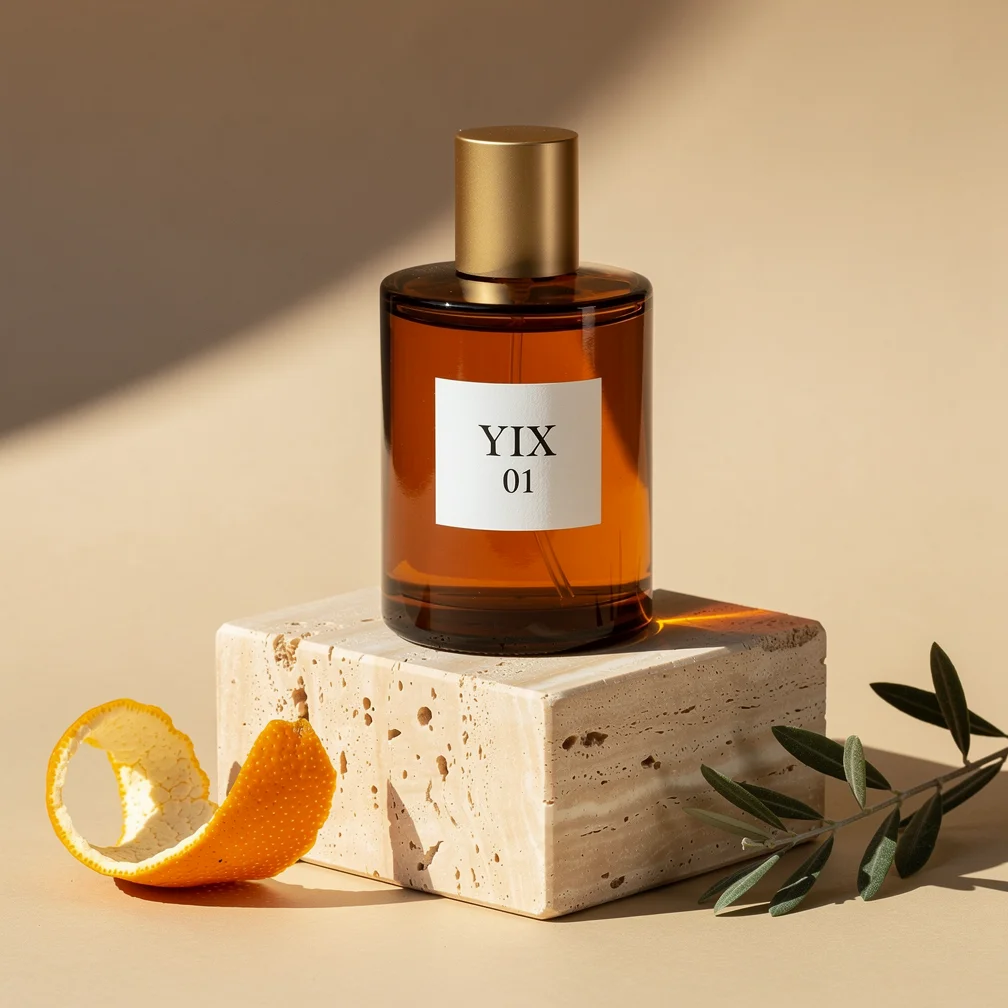
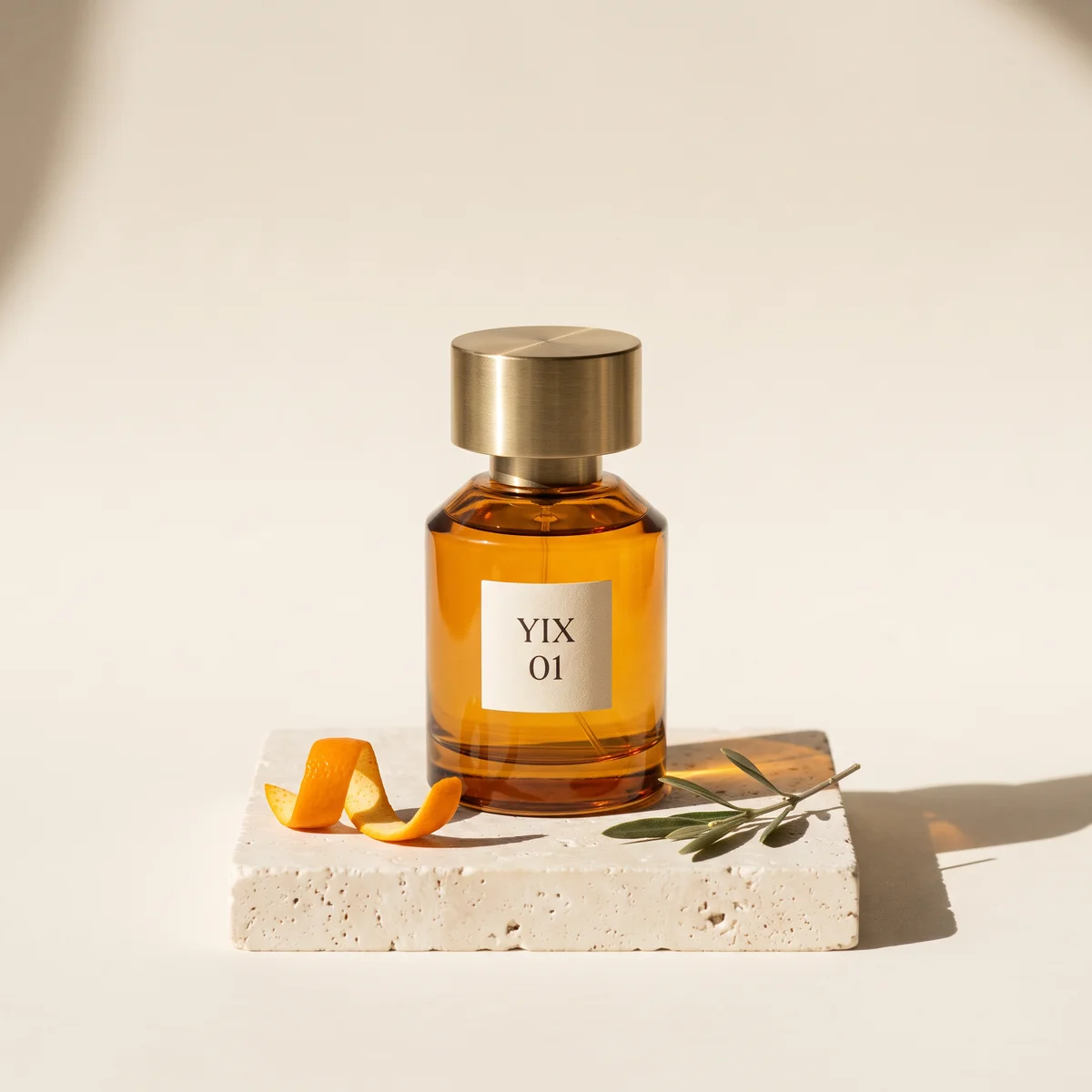
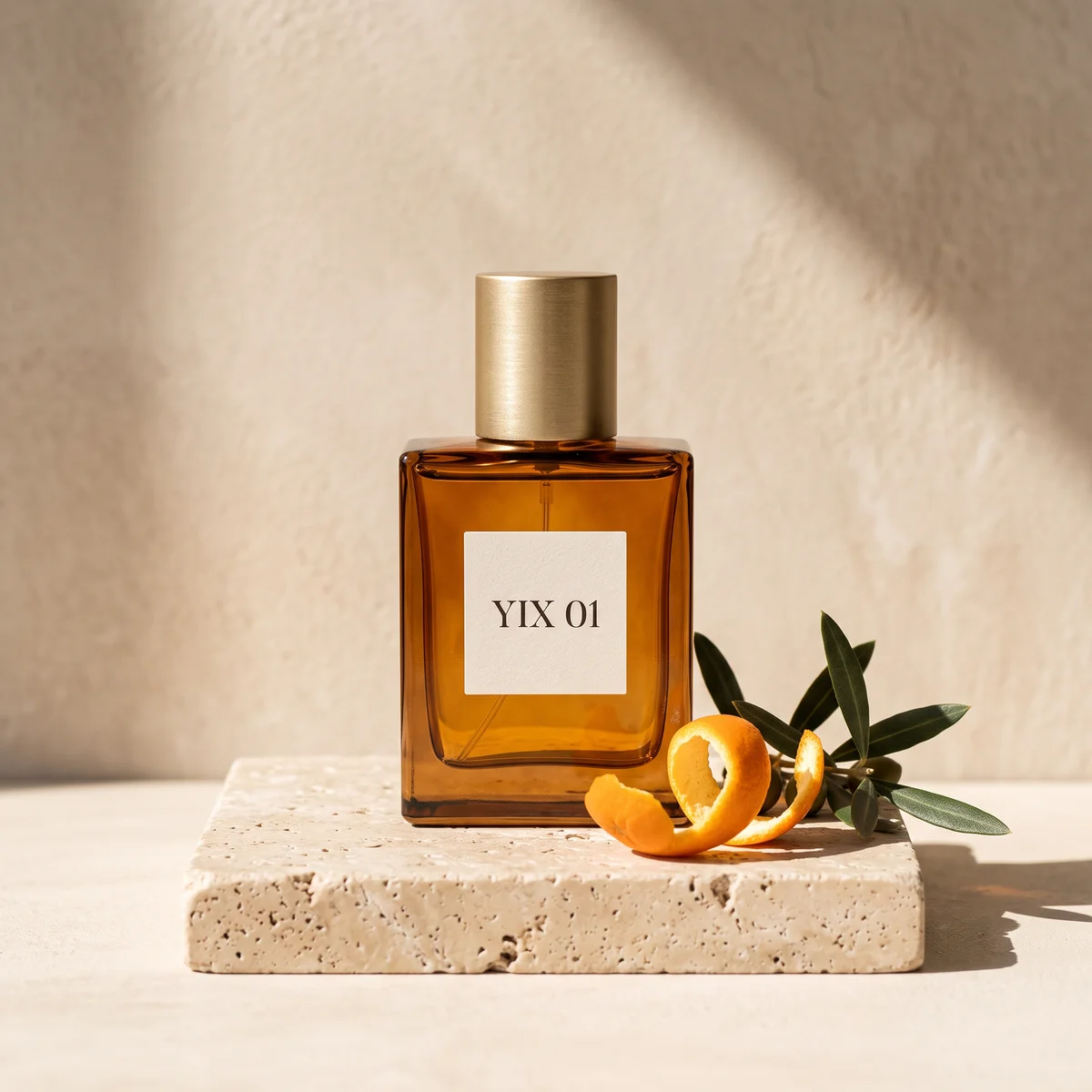
The three first attempts below: Same extracted prompt, square format, no reference image sent to the generators. These are individual examples, not a model benchmark.
2K · 1:1
Try this prompt1 MP · 1:1
Try this prompt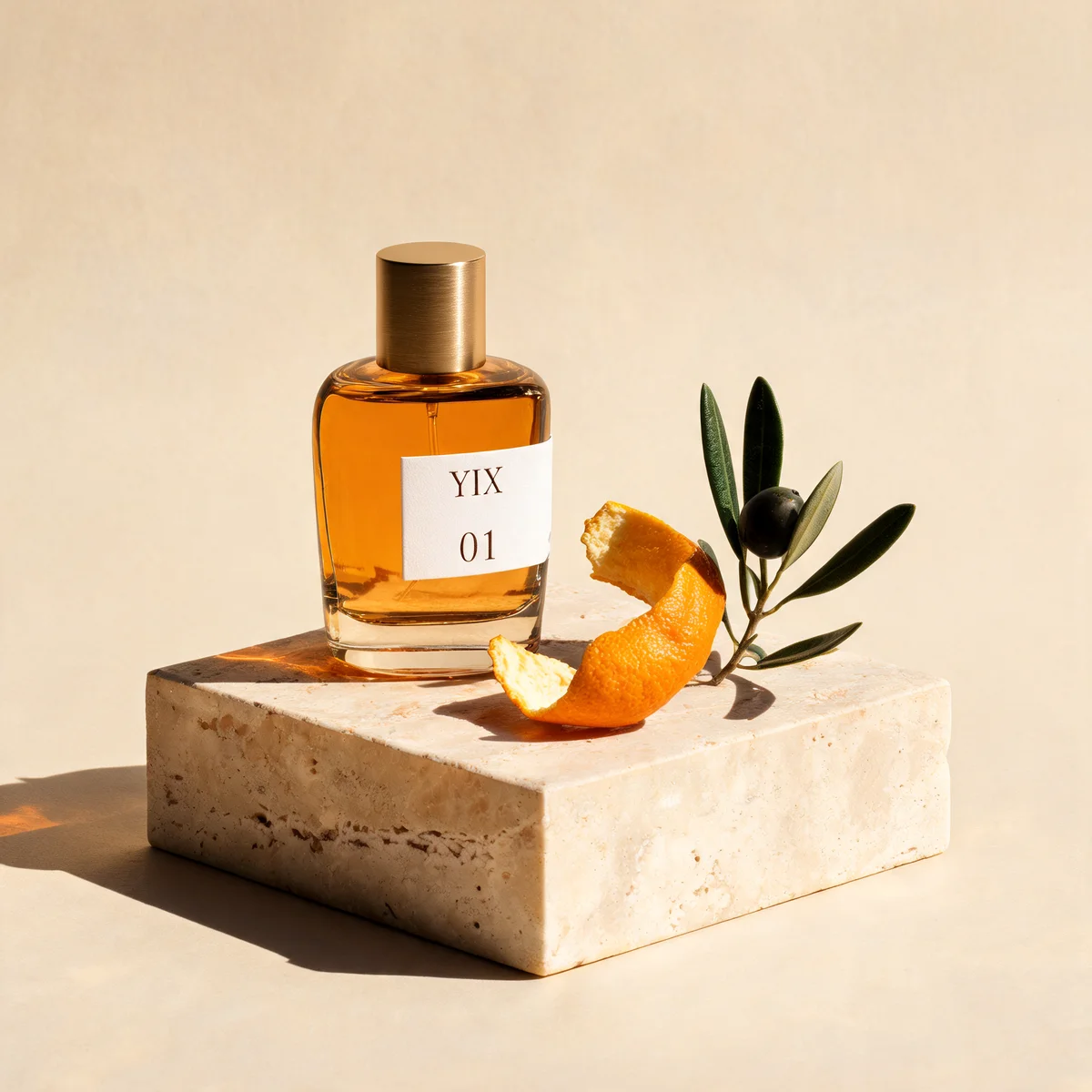
2K · 1:1
Try this prompt3. Compare the first attempts before spending on a retry
All three images came from one request per model, with one output per request. There was no hidden batch from which we picked a winner. The different output sizes also matter: the FLUX image was 1008 × 1008 pixels, while Nano Banana and Seedream returned 2048 × 2048. The previews are resized for this page, so use this comparison to inspect layout and visible details, not to rank maximum-resolution sharpness.
| Model and setting | Credits for this image | What this result kept | What visibly changed |
|---|---|---|---|
| Nano Banana 2, 2K | 80 | Warm amber glass, low slab, porous stone and directional light | The bottle became rectangular, the label moved onto one line, and both props clustered to the right |
| FLUX.2 Pro, 1 MP | 20 | Round bottle, two-line lettering, peel on the left and branch on the right | The cap narrowed, the stone became a tall block, and the props moved off the block |
| Seedream 5 Lite, 2K | 30 | Amber palette, readable two-line label and a strongly lit product scene | The bottle became squarer, the branch stood upright with an olive, and the shadow fell left |
These are historical charges from the original test, not current prices. At the current rates, the same settings cost 70 credits for Nano Banana 2, 20 for FLUX.2 Pro, and 30 for Seedream 5 Lite. Check the generator for the current quote.
For resemblance to this reference, we chose the FLUX result as the strongest first attempt. The round bottle and label layout mattered more to our brief than the greater pixel count of the other two images. That is a judgment about these particular pictures, not a general claim that FLUX is the best product-photography model.
Notice how several deviations follow directly from missing words. “Brushed gold cap” does not specify a wide, short cylinder. “Square travertine pedestal” does not say how thick the stone should be. “Lie beside it” leaves the model to decide whether the props sit on the stone or on the surrounding surface. Even a fluent extracted prompt needs checking against your priorities.
4. Add the missing constraints, then regenerate
We kept the original prompt and appended the following correction for one more FLUX.2 Pro generation at 1 MP. We again supplied text only and kept the 1:1 ratio. This is an edited prompt, separate from the untouched extraction shown above.
Composition correction: Keep the bottle cylindrical, with a broad, low brushed-gold cylindrical cap almost as wide as the bottle. Put the whole bottle in the lower two thirds of the square frame and leave the upper third as empty warm off-white background. Use a low, wide travertine slab, not a tall cube. Keep the orange peel on the left and the small olive twig lying flat on the right, both on top of the slab. The label must show YIX on the first line and 01 on the second. Sunlight enters from the upper left and the long shadow falls to the right.
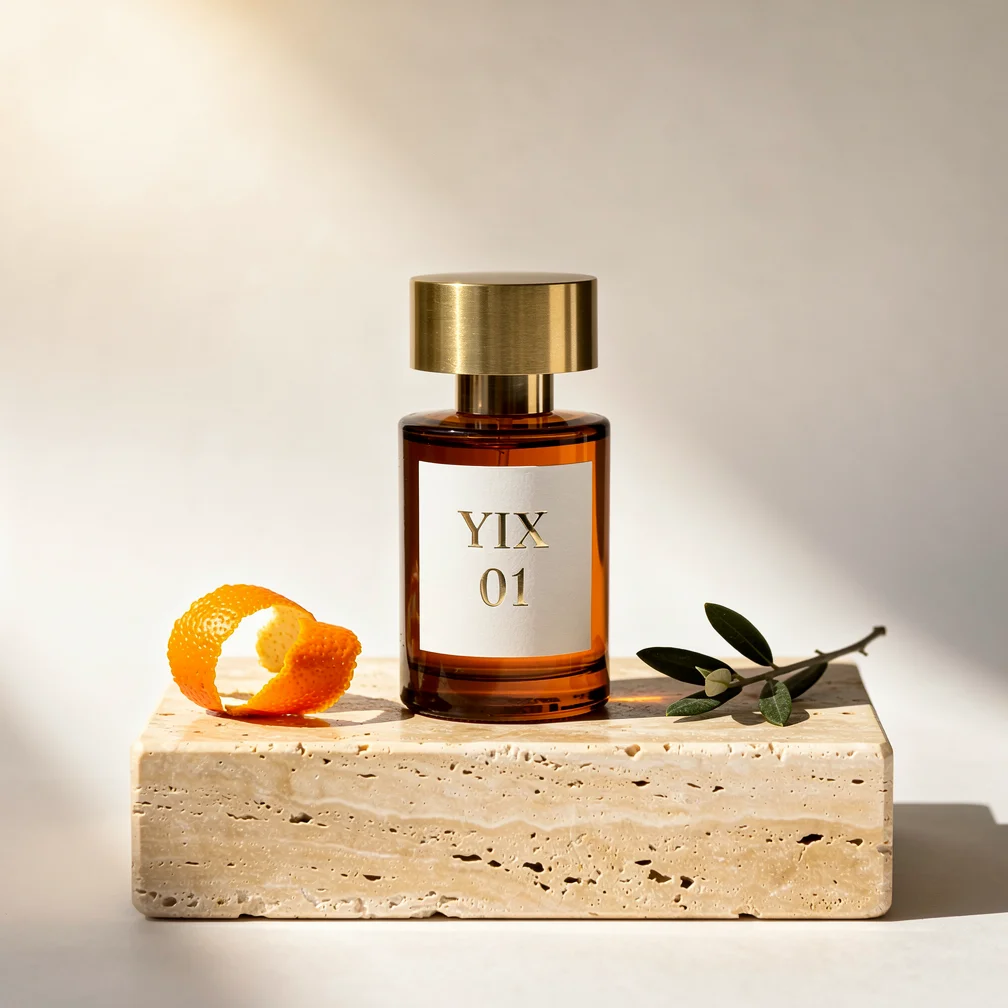
One additional FLUX.2 Pro image, 1 MP, 1:1, 20 credits. Original extraction plus the correction above; no reference image input.
The revision brought back a wider cap, a shallower stone slab, clear space above the bottle and both props on top of the stone. We chose it as the final example because those changes bring the arrangement closer to the reference. It still is not a duplicate: the bottle is slimmer, the label is larger, the neck is more exposed and the peel forms a different curl. Several constraints changed together, so this one retry cannot tell us which sentence contributed most.
The whole exercise used 230 credits: 80 for the original reference, 130 for the three first attempts and 20 for the correction. Image analysis itself did not deduct image-generation credits. These are the charges for this run; check the cost shown in the generator before repeating it. You do not need to generate a reference if you already have one you can use.
5. Repeat the workflow with your own product scene
Upload a clear reference to Image to Prompt. Read the extracted prompt alongside the picture before clicking through to a generator. Name the bottle shape, label layout, light direction and object positions that must survive. Leave out details that do not matter to the intended use; adding every visible texture can bury the few constraints that actually determine the composition.
Try one output at the intended ratio first. Compare the silhouette and text before evaluating mood. If the picture is appealing but the product is wrong, decide whether you need a text correction or a workflow that takes the product image as a reference. Repeated text-only attempts are a poor substitute for supplying the package you need to preserve.
The buttons below load the exact first-round prompt and each model’s settings. They open an editable generator; they do not start a paid request. For this same task, inspect the results before changing both the prompt and the model at once. That makes the next revision easier to explain and reproduce.