Describe one small movement. GPT Image 2.6 turns your prompt into a short animated GIF for reactions, playful icons and simple visual loops. Choose 4 or 9 frames, review the price, then generate.
Your prompt draft stays in this tab for 30 minutes so you can continue after signing in.
512 × 512 px · GIF · 0.8 seconds per cycle, no audio
Your result appears here. Try an example below to fill the prompt without starting a paid task.
What you can make here
Input
A text prompt of up to 4,000 characters. Describe one subject, one action and a fixed background. This page does not accept image or video uploads.
Output
One 512 × 512 animated GIF per task, with 4 or 9 frames and no audio. Choose 100, 200 or 400 ms per frame: 0.4–3.6 seconds per cycle.
Access and credits
A verified YIX account and sufficient credits are required. Low quality costs 50 credits for 4 frames or 100 for 9. The exact quote appears before submission; there is no free GIF generation.
Best fit and limits
Best suited to short reactions, moving icons and simple single-subject animations. More frames give the model more motion steps, but do not guarantee smooth movement or a seamless loop.
Real GIF examples and reusable prompts
These examples were generated through this tool. Watch the looping animations, or use a prompt as a starting point. Selecting a prompt does not start a paid task. Results vary; these are individual examples, not a success-rate claim.
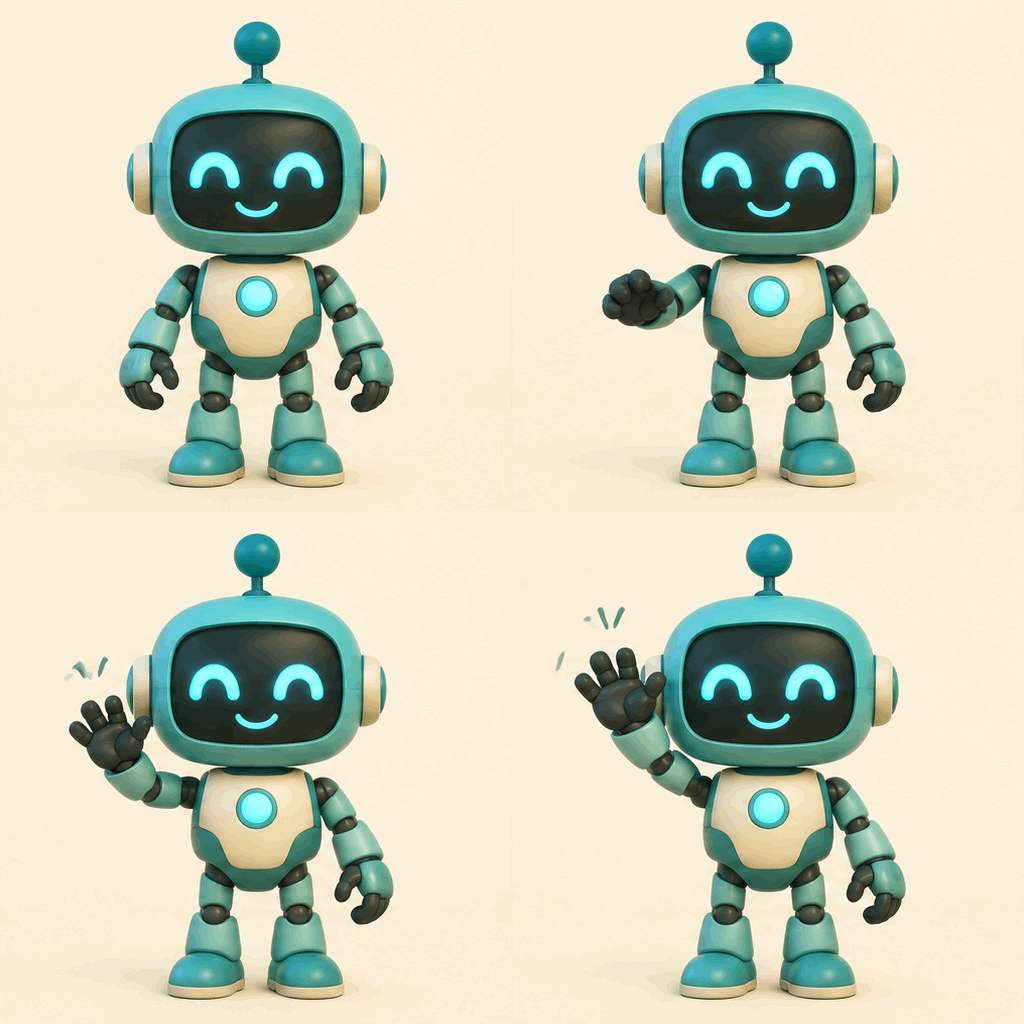
Four clear poses, with a noticeable reset at the end. Use a smaller gesture if a softer loop matters.
View original prompt
A small friendly teal robot raises its right hand in a gentle wave, then returns to the starting pose. Simple rounded shapes, warm cream background, fixed camera, full body centered, no text. A short repeating animation.
Nine frames give the steam more stages. The cup stays mostly still; the loop boundary is still visible.
View original prompt
A terracotta coffee cup stays still while one soft curl of steam rises and fades above it. Warm cream background, clean flat illustration, fixed camera, no text. Subtle repeating movement, keep the cup unchanged.
A simple rotation study in four frames. Rotation and shape may vary between new attempts.
View original prompt
A small golden four-point star gently rotates around its center against a deep navy background. Simple flat geometric illustration, fixed camera, centered composition, no text. End at the starting orientation for a repeating animation.
Describe a subject and a small repeatable action, such as a robot raising one hand. Keep the camera fixed and the background simple.
Choose Flare or Sunburst, quality, frame count and frame duration. Sign in, check the quote, then submit one task.
Wait for generation and content checks. Play the result, inspect the motion, and download the GIF. Your task remains in My Creations if you leave the page.
Choose a short draft before spending more
Start with 4 frames at Low quality to check the idea. Use 9 frames when you need more distinct motion steps. Frame duration changes playback speed, not the number of generated frames.
Frames
Low
Medium
High
4
50
100
100
9
100
150
200
Credits per GIF, without reference images. Both GPT Image 2.6 models use these rates. Existing YIX credit packs apply; check Pricing for pack prices and validity. A failed generation returns reserved credits according to the task status; a credit return is not a cash refund.
If the subject changes shape, reduce the movement and remove competing actions. If the end jumps back to the beginning, ask the subject to return to its starting pose. Nine frames can still look stepped at slow playback. Detailed lettering, multiple interacting characters and exact choreography are less reliable. GIF has no audio and a limited color palette; this page does not create MP4 videos or vector SVG files.
Before you generate
Is this a free AI GIF generator?
No. Browsing the examples is free, but generating requires a verified YIX account and credits. A 4-frame Low-quality GIF costs 50 credits; 9 frames cost 100. Check your quote before submitting. The free generation allowance for this tool is 0 GIFs; paid credits use your shared YIX balance.
What do I get, and is there a watermark?
You get one downloadable 512 × 512 GIF. YIX does not add a visible watermark. The GIF has no audio; this page does not export MP4 or SVG.
How long can my GIF be?
Choose 4 or 9 frames at 100, 200 or 400 milliseconds each. One cycle lasts 0.4–3.6 seconds. Longer playback does not add more motion detail.
How long does generation take?
We do not yet have a stable time range. Generation time varies with model load and the prompt. The page shows the task status while generation and content checks run. You can return to the same task from your creations; do not submit again just because a response is slow.
What subjects work, and can I upload a photo?
Simple reactions, moving icons and single-subject illustrations are suitable starting points. This page currently takes text only; it does not animate uploaded photos or convert existing video. Complex choreography and readable lettering are less predictable.
Will every result loop smoothly?
No. Start with one subject, a fixed camera and a small motion that returns to its starting pose. Inspect the actual GIF before using it; extra frames and higher quality do not guarantee perfect continuity.