
Prompt Saar: adapt a photo prompt without losing your subject
Turn Prompt Saar inspiration into a clear photo-editing brief. Use original portrait, cinematic and couple examples while keeping your subject and framing.
 Yix Team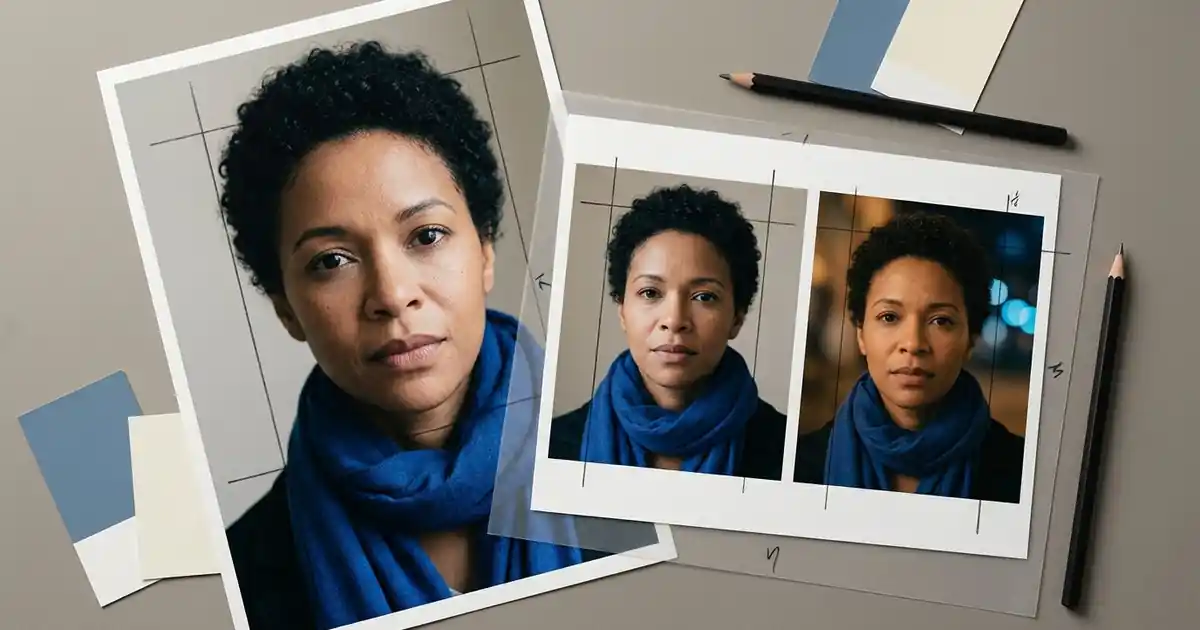
To adapt a Prompt Saar idea to your own photo, describe what must stay first, then request one visible change. Keep the person's face, pose and framing separate from the lighting, clothing or background you want to edit. Copying a style description unchanged can ask for a person or composition that does not match your reference.
If you are looking for the library itself, visit PromptSaar's official website. On October 12, 2026, its homepage showed Portrait, Cinematic, Couple and other categories, alongside model labels including Gemini, ChatGPT and Instagram Meta AI. This is an independent Yix tutorial with original examples; we are not affiliated with PromptSaar and have not reproduced its prompt library or pictures.
Cover: Imagen-generated editorial artwork showing a fictional adult portrait and two lighting variations. It illustrates the planning process, not tested results from the prompts below.
Choose the change before choosing the wording
Start with a photo you have permission to edit and a concrete goal: softer window light, a quieter background or a cinematic colour treatment. Write down which part of the inspiration you want. “Warm light on the face with a cool background” is useful; “make this viral” leaves the visual decisions unspecified.
Check whether your reference supports the requested composition. A tight headshot contains no information about a full outfit or standing pose. Asking for a full-body result adds reconstruction to the task. If likeness matters more than a dramatic scene, keep the crop close to the original and change the setting or light first.
A model label on a prompt page is context, not a guarantee that another editor will interpret the wording identically. Yix's card here selects Nano Banana 2 for image editing. It does not import a PromptSaar preset, reproduce another provider's settings or open a video generator.
Rewrite the idea as five small decisions
Use the following brief before writing a paragraph. Replace the example details with what is actually visible in your photo.
| Decision | Example for a portrait |
|---|---|
| Keep | The same adult, short curly hair, blue scarf and head angle |
| Change | Replace the busy background with a plain warm grey wall |
| Frame | Keep the existing head-and-shoulders crop |
| Light | Soft window light from camera left, gentle shadows |
| Exclude | Extra people, lettering, logos and artificial skin smoothing |
Do not keep incompatible instructions just because they sound photographic. “Full-body wide shot” conflicts with “preserve the head-and-shoulders crop.” “Keep the outfit” conflicts with a detailed description of different clothes. Resolve those choices before submitting rather than making the model guess which sentence matters most.
For two people, give each a short visible identifier and a position. “Adult in the blue shirt on the left” is easier to distinguish from “adult in the cream sweater on the right” than two repeated references to “the person.” Keep those identifiers consistent throughout the brief.
Three original starting prompts
These examples are untested editing briefs written for this guide. They request recognizable subjects but cannot guarantee identity preservation. Change the clothing, positions and crop to match your reference; do not copy details that describe someone else.
A natural window-light portrait
Edit the supplied adult portrait. Preserve the person's facial proportions, short curly hair, blue scarf, expression and head-and-shoulders framing. Replace only the background with a plain warm grey wall. Use soft window light from camera left with gentle shadows and natural skin texture. Keep the camera at eye level. Do not add people, accessories, lettering or logos, and do not smooth away visible facial detail.
Use this when the reference already has a useful pose. If the scarf or hair in your photo differs, name the real features or simply say “keep the existing hair and clothing.”
A blue-hour cinematic still
Edit the supplied adult portrait into a restrained cinematic still at blue hour. Keep the same face, hairstyle, outfit, head angle and chest-up crop. Place a softly blurred city street behind the person, with a few cool blue lights and a gentle amber light on one side of the face. Maintain believable skin texture and a clearly visible expression. No rain over the face, new accessories, signs, text or extra people.
“Cinematic” describes the requested treatment here; it does not turn a still image into a clip. If the background overwhelms the face, reduce the number and brightness of the lights before adding more effects.
A couple portrait with fixed positions
Edit the supplied photograph of two adults. Keep the adult in the blue shirt on the left and the adult in the cream sweater on the right. Preserve both faces, their relative height, spacing, existing hand positions and waist-up framing. Change the background to a simple cafe wall with warm afternoon light. Keep two distinct bodies and natural hands. Do not swap their clothing, add a third person, invent an embrace or introduce text and logos.
Use one photo containing both adults. The linked Yix workflow accepts one reference image; it does not provide separate uploads for each person. If your source photographs are separate, prepare a clear combined reference first, or choose a workflow that explicitly supports multiple references.
Generate once, then compare specific details
Open the card above, upload a JPG, PNG or WebP file up to 7 MB, and wait for its preview. Paste one adapted brief. Confirm Nano Banana 2, the selected output settings and the displayed credit cost. Opening the editor does not submit a generation; sign in if requested and check the photo preview again before proceeding.
Compare the result with the original at a similar viewing size. Look at facial proportions, hairline, clothing, hands and crop before judging the colour treatment. If a face changed, return to the original reference and request a smaller edit. If the face is acceptable but the background is too busy, change that instruction alone. Repeated generation can incur further costs and is not a guaranteed correction.
Save the original, chosen output and final instruction together. For another way to turn a style reference into a short editing brief, read the Roy Edit AI prompt guide. The useful result is a prompt that fits your photograph, with changes you can name and review.