
A Krea MCP alternative for generating images in Claude Code or Codex
Connect Yix to Claude Code or Codex, quote one image, upload a reference and retrieve the finished task. Includes copyable requests and retry guidance.
 Yix Team
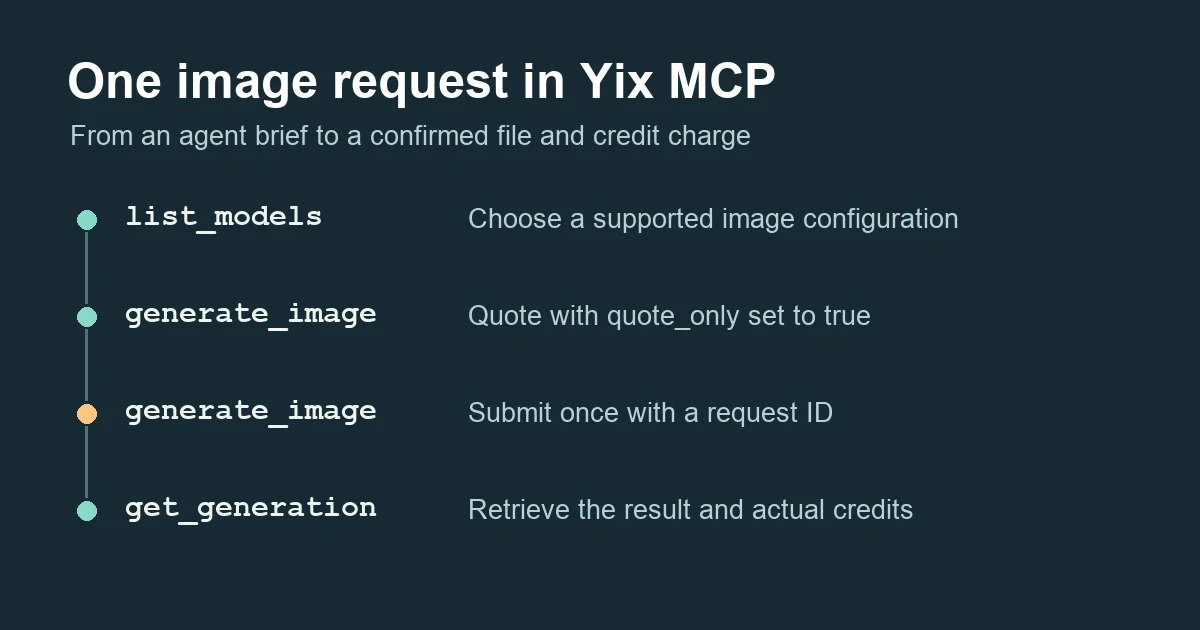
If a colleague says “use Krea MCP for the header image,” find out whether they need a particular Krea model or just a finished image in the chat where the site is being built. The first requirement points to Krea. The second leaves you a choice. Yix has a remote MCP server you can connect to Claude Code or Codex. It lets the agent inspect available models, get a quote for a proposed image, submit a generation under your Yix account and retrieve the finished result.
The two server addresses are different. Krea documents https://api.krea.ai/mcp. The Yix guide gives https://mcp.yix.ai and specifies Streamable HTTP. Enter the address for the account you intend to use. Nothing about configuring a second server transfers a paid balance, an image library or a workspace from the first. For the current setup instructions, see the Krea MCP page and the Yix MCP connection guide.
What the image job looks like from your editor
Suppose you are building a landing page for a pottery studio. The designer has left a wide rectangle above the headline and asked for a photograph of two unglazed cups on a pine workbench. You already have the page open in your coding assistant. MCP gives that assistant a defined set of tools it can call on the image service. The conversation carries your brief. Yix handles the image task and the credits associated with it. Your application can remain an ordinary website that serves the approved image as an asset.
Four separate outcomes matter here. The client can reach the server. You have authorized the correct account. A particular generation request has been accepted. A finished image is ready. Getting through the first two says nothing about the last two. In particular, a task ID is a way to look up a job. It does not mean a usable file has already been produced. Make the agent report which step it reached and you can usually diagnose a problem without another paid attempt.
Yix's public guide includes a setup prompt for each supported client. The sequence below follows those instructions and the Yix tool definitions. The example art brief is a proposed job you can try. The guide doesn't report a paid benchmark or a contest between model outputs. You can follow the connection and quote steps without ordering a paid image.
Connect Yix in Claude Code or Codex
In Claude Code, use the Claude Code instructions on the Yix guide to add a remote HTTP MCP server with the Yix address. Give it a recognizable name such as “yix.” If you already have a Krea connector, leave its name distinct so that later requests can say which service to use. Start the authorization flow in the client. Follow the generated sign-in link, check the Yix account, review the access requested and approve it if it is the account you want to charge for future work.
In Codex, open MCP settings or use the client's MCP command-line interface to add the remote server. Choose Streamable HTTP and use the same Yix address. The documented connection uses OAuth dynamic client registration. Leave client ID and client secret blank for this flow. If your client starts a local callback, leave it running and finish sign-in on the same computer. Closing the terminal immediately after the browser opens can leave you looking at a successful login in a browser while the actual client still lacks an authorized session.
Once the client connects, paste this request.
Connect to the Yix server I configured. List its tools and ask for the available image models. Tell me which account balance this connection can see. Stop after the read-only checks. I want to choose a model before generating an image.
A tool list is the first sign you connected to the server you intended. Look for list_models, generate_image, get_generation and get_credit_balance. For a job with a reference you will also need prepare_reference_upload. If the client can't list tools yet, stay with the connection problem. Rewriting the creative brief or reducing the requested image size won't fix an unfinished authorization.
Ask the live model catalog before writing a request
An image model name displayed on a marketing page may differ from the identifier the server accepts. Ask the agent to call list_models with image output and report the model IDs, available tiers and permitted aspect ratios. If you want to edit an existing photograph, also ask about image reference support. Yix exposes that information so clients can build a request from currently supported options. Copying an old model ID from a chat transcript is a poor substitute when the catalog is a free call away.
For the pottery photograph, think about the layout before model shopping. How wide is the hero image in the actual design? Is the headline laid on top of the left third, or does it sit above the picture? A model that accepts a suitable landscape shape will give the cups more breathing room. If the output must fit a narrow portrait card later, that is another composition to plan. Cropping a wide shot to its center may cut off both handles and leave a photograph of an empty table.
Give the assistant one job at a time. An instruction to generate a photo, explore three alternative styles and install the best image in your codebase quietly combines art direction, several billable tasks and a file change. Ask for the cost of the header first. You can decide about additional views once you see a strong enough result to justify them.
Quote one image without submitting it
The Yix generate_image tool accepts quote_only. When true, the service returns the quoted credits, sets submitted to false and reports zero actual credits for that quote. This lets you check the exact combination of model, tier and framing before requesting a real task. The following is a message for your agent in ordinary English. Let it fill the structured call from the catalog it just read.
Prepare a quote for one landscape photograph of two handmade cream cups on a pale pine workbench. Put the cups in the right half with handles visible. Keep the left half quietly lit for a headline that I will add in HTML. Use an available image model and tell me the model ID, tier and aspect ratio you selected. Call generate_image with quote_only set to true. Return the quoted credits and whether a task was submitted. Stop there.
A useful quote response tells you exactly what it prices. “This should be cheap” is hard to compare with a balance. Ask for the numeric credits and the settings the assistant actually passed. If the quote is higher than expected, change one variable, such as the tier, and quote it again. Keep both quotes attached to their respective settings. A cheaper draft may be a reasonable way to judge composition, but it does not tell you what a different final setting will cost.
When you approve a real generation, Yix supports a max_credits ceiling on the call. Set it to the amount you actually approved. The server checks the requested price against that ceiling. Keep the prompt, tier and aspect ratio from the agreed quote if you want to compare the quoted and final credits meaningfully. Asking for another size or a more detailed model after approval changes what you priced.
Add a reference when the product must be recognizable
For an imaginary pottery studio, an original generated still might be enough to test layout. For a shop selling two actual cups, use a reference photograph that shows the handles, glaze and proportions. Start by checking that the chosen model accepts reference images. Have the agent call prepare_reference_upload for an image. The service can provide a short-lived upload route or a browser upload link. Follow the upload instructions, then pass the returned reference identifier with the generation request.
A file path on your laptop is meaningful to an assistant with access to that laptop. It is not, by itself, an uploaded image at the remote server. If a result looks like two generic mugs, check the request for the reference identifier before editing the art direction. Keep the source file somewhere you can find again and give it a descriptive name. In a conversation with several attachments, “use the cup photo” can end up referring to a screen capture of the design rather than to the physical cups.
Here is a more useful reference edit brief for the same header.
Use the uploaded mug photograph as the product reference. Keep the two irregular handles, the speckled cream glaze and the small unglazed bands at the bases. Replace the background with the pine workbench from the layout brief. Keep the cups together on the right and show enough of the table to crop the image for a wide header. Leave the image free of text.
After upload, the agent should carry the returned IDs into reference_image_ids. A quote can reflect the proposed request while leaving the job unsubmitted. If you have an urgent one-off edit and don't need it integrated with your coding client, the Yix image-to-image web editor offers a shorter visual route to inspecting the source, editing the instruction and comparing the result.
Submit once and recover the same job
For a billable call, have the agent choose a unique request_id in UUID format and save it with the approved parameters. A retry of the same logical request should reuse the ID and those same parameters. This matters if a terminal loses its connection after submission. A new UUID describes a new request to the service. Changing the prompt while trying to reuse an existing request ID can produce a parameter conflict. Keep recovery and creative revisions distinct in your job notes.
When the call returns a task ID, use get_generation to check it. If you lose track of the ID, list_generations can help locate in-progress or recent work on the authorized account. Match the job against your actual brief and time before resuming it. A second designer might have another landscape image running under the same account. “The most recent image” is only a good identifier if you know which request it belongs to.
For a completed job, ask for the result and the actual_credits reported by the status tool. For a job still running, record its state and leave the final cost open. An empty final-cost field in an in-progress response is not a number to enter as zero. If you want the overall account balance, ask get_credit_balance separately. Other activity on the account can make a balance change a poor way to infer the charge for one task.
Troubleshoot a connection that worked yesterday
Start at the last point where you still have evidence. If the server is listed in the client but no tools appear, reopen the client's connection status and verify the address and authorization. If the tools appear and the catalog responds, you have already passed that stage. An unsupported aspect ratio or a reference count above the model's limit is a request problem. Read the allowed settings from the catalog and change the job specification before getting another quote.
A stale upload link has a different symptom. The source file still exists on your computer, but the short-lived upload destination may have expired before the transfer finished. Prepare a fresh upload and verify which reference identifier belongs to it. If you only obtained a quote, there is no paid job to recover. If you submitted a task, look for the existing task first. A second upload can supply a future revision without requiring you to submit the original image job twice.
Keep error messages in their original wording when handing the incident to a teammate, and remove temporary upload URLs and sign-in links from the note. Include the service, the step you reached and whether a task ID exists. Those three facts usually save the next person from repeating your connection checks or mistaking an unsubmitted quote for a failed generation.
Decide whether the image can ship
Bring the image into the actual layout at a preview size before asking the assistant to change the code. Put the real headline and button over the left third. Does a knot in the wood sit directly behind a thin letter? Have the two cups drifted so far right that a mobile crop cuts through a handle? Look at the source photograph again if this is real merchandise. A beautifully lit cup with a completely different handle is still the wrong product.
If you ask for another version, name the defect that would make the new image earn its place. “Keep the cups exactly where they are and move the brightest knot below the headline” is clear enough to evaluate. A new version deserves its own quote and request ID. If a small crop solves the issue, do that locally. A simple framing change needn't become a fresh generation because the client happens to have an image tool available.
A compact handoff for the designer has the final file, its approved use, the source of any reference photo, the model and settings, the task ID and the actual credits. Keep authorization links and private upload links out of that handoff. If the account or model matters to future iterations, write down which service produced the deliverable. Krea's connected workspace and Yix's connected account each have their own context. The image asset is the part you can deliberately carry into the project you are building.