
AI 商品照提示詞:香水、保養品和飲料的三套場景範本
用 AI 商品照提示詞把清晰的商品照片變成場景圖:這篇教學結合 Yix Product Studio 的香水、保養品和飲料案例,介紹參考圖準備、背景與光線寫法、提示詞編輯、包裝細節檢查,以及從靜態圖片製作 5 秒影片的操作。附可直接參考的英文場景提示詞,說明修改後與範例不一致的可能性,並列出生成圖片和影片的點數範例。
 Yix Team

AI 商品照提示詞要先說清楚商品長什麼樣,再安排背景。光寫「高階感、大片、精緻」,模型仍要自己決定檯面、光線和道具的位置,生成結果很容易好看卻不好用。
Yix Product Studio 商品場景圖工具把這個過程放在同一頁:上傳商品照,選擇場景,生成靜態圖片,檢查包裝後再做 5 秒影片。下面用香水、保養品和飲料三組實際生成的案例,說明提示詞怎麼寫、怎麼改。
三套 AI 商品照提示詞的場景部分
選擇範本後,Product Studio 會載入完整提示詞。下面保留英文原文,方便直接對照編輯;它們只是場景部分,使用時仍需保留前後的商品身份和排除項要求。
香水:暖色石檯與玻璃反光
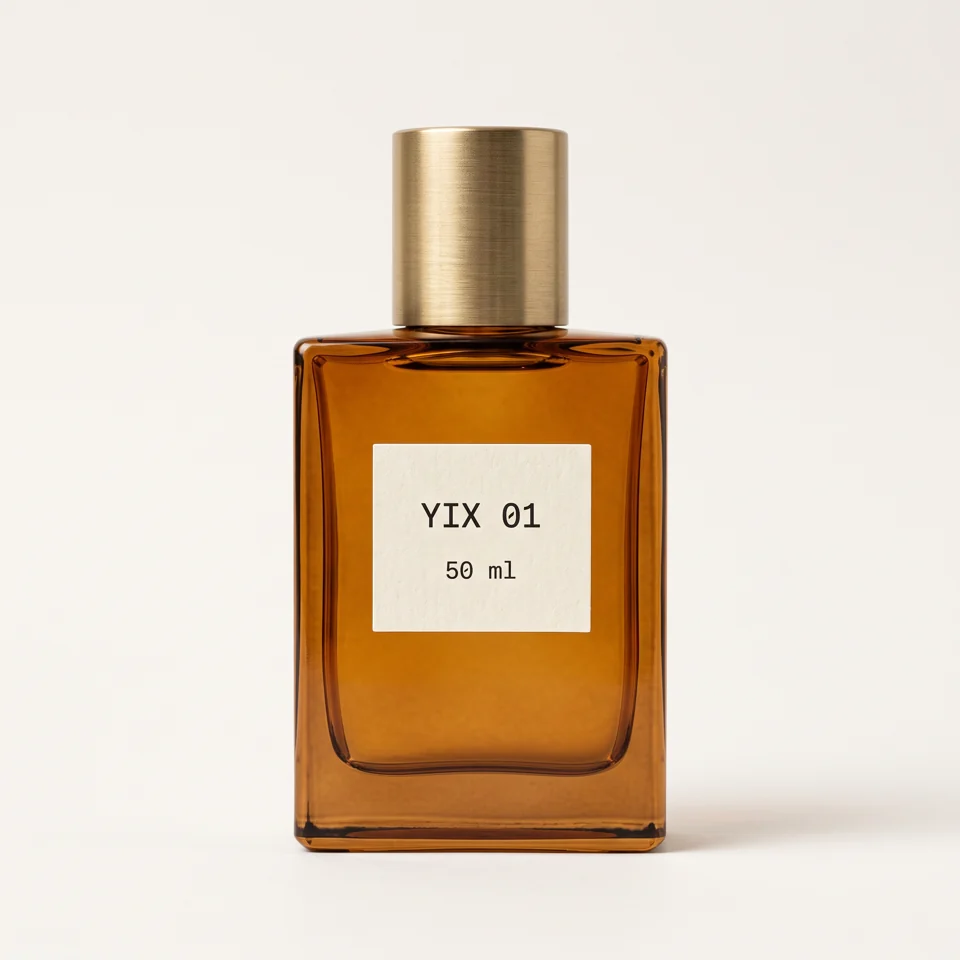
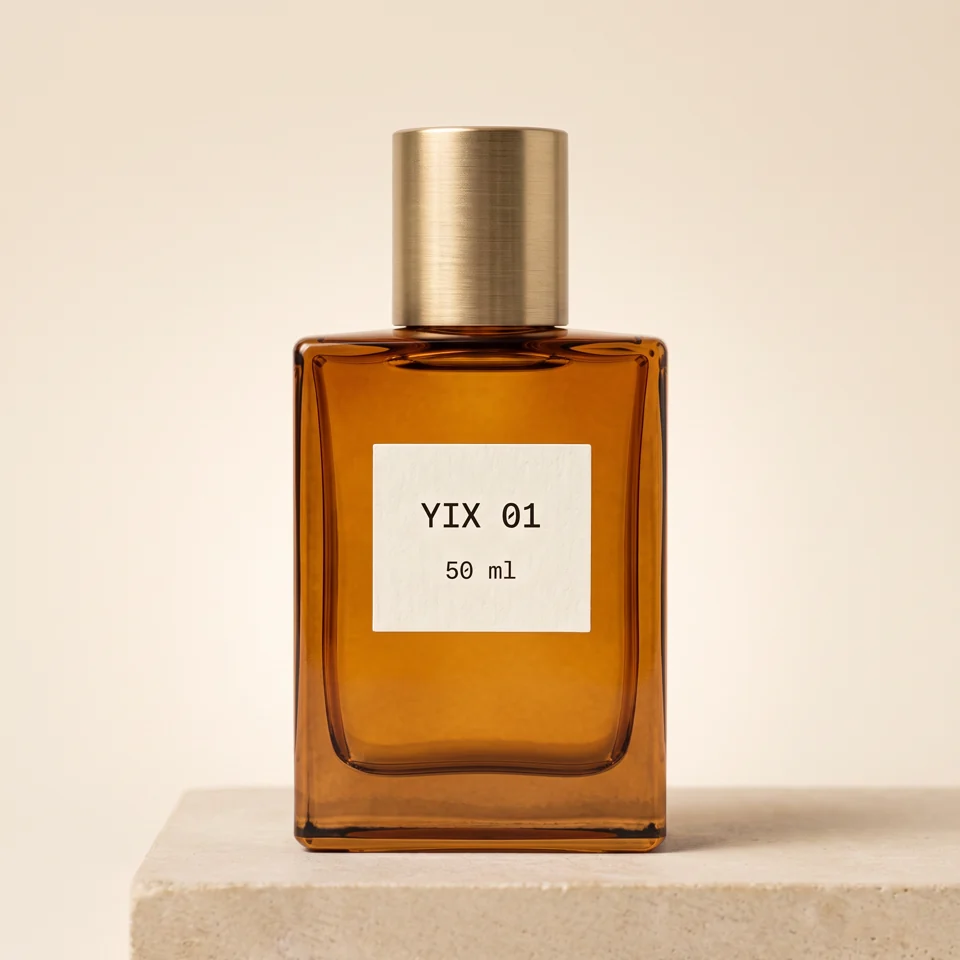
左邊是參考圖,右邊是生成的暖石場景。
Place the supplied product upright on a low matte limestone slab. Warm ivory seamless backdrop, restrained amber palette. One large diffused key light at camera-left and a narrow soft rim behind the glass. Physically plausible contact shadow and subtle glass reflections; the front label remains evenly readable. Generous clear space around the full silhouette. Eye-level 85mm commercial still-life photography. The only hero object is the supplied product.
這套寫法把光源位置和標籤可讀性交代得很清楚。玻璃需要反光,但亮斑不能蓋住品牌名。生成後對比瓶肩、瓶蓋和液體顏色;想換氣氛,可以先改檯面或背景顏色,保留布光要求。
保養品:把植物放到商品後面
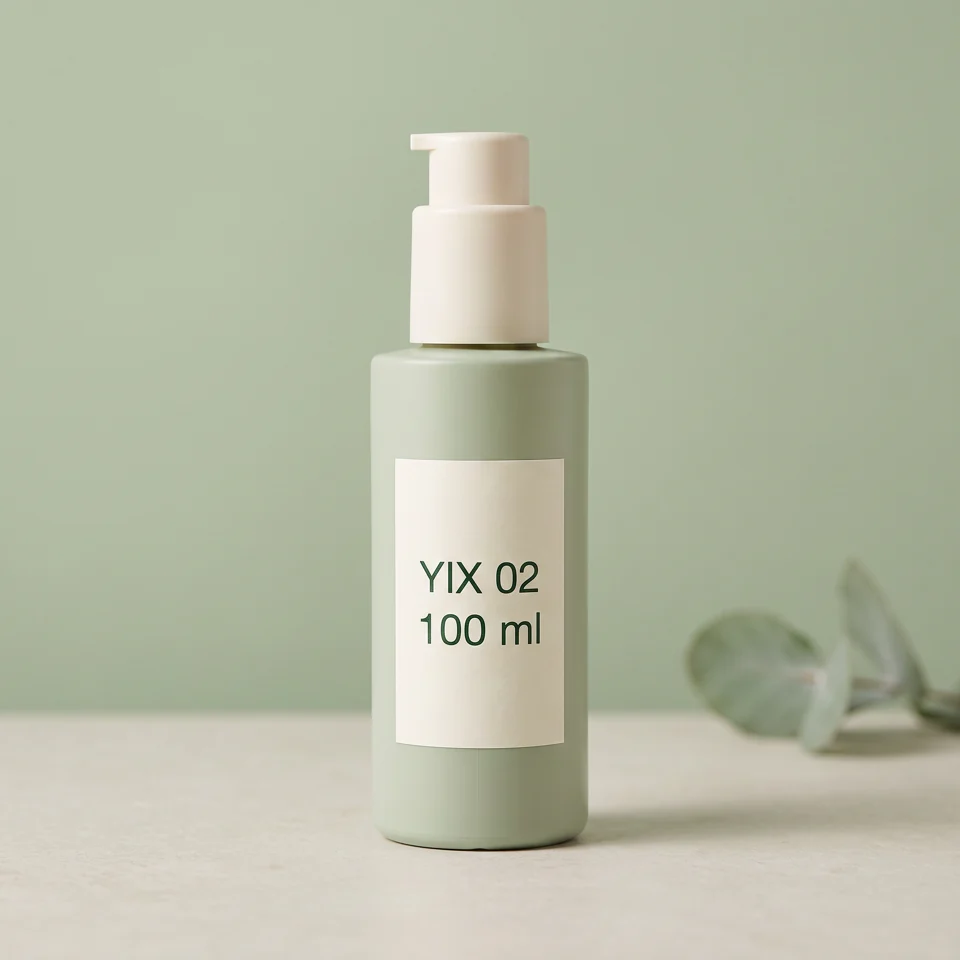
Place the supplied product upright on a pale matte stone surface against a soft sage studio backdrop. Broad diffused window light from camera-left, gentle fill on the label, natural contact shadow. One softly blurred leaf far behind the product, separated from its silhouette. Calm, clean skincare editorial photography, eye-level 85mm lens. Product fully visible, front facing, with generous breathing room. Keep the surface dry and the composition minimal.
葉片放遠一些,不遮住泵頭和成分標示。綠色包裝搭綠色背景時,如果邊緣不清楚,可以改成暖灰色背景。道具也要符合真實商品,不能因為畫面裡出現某種植物,就讓消費者誤以為商品含有這種成分。
飲料:先做靜態冷感,再考慮水花
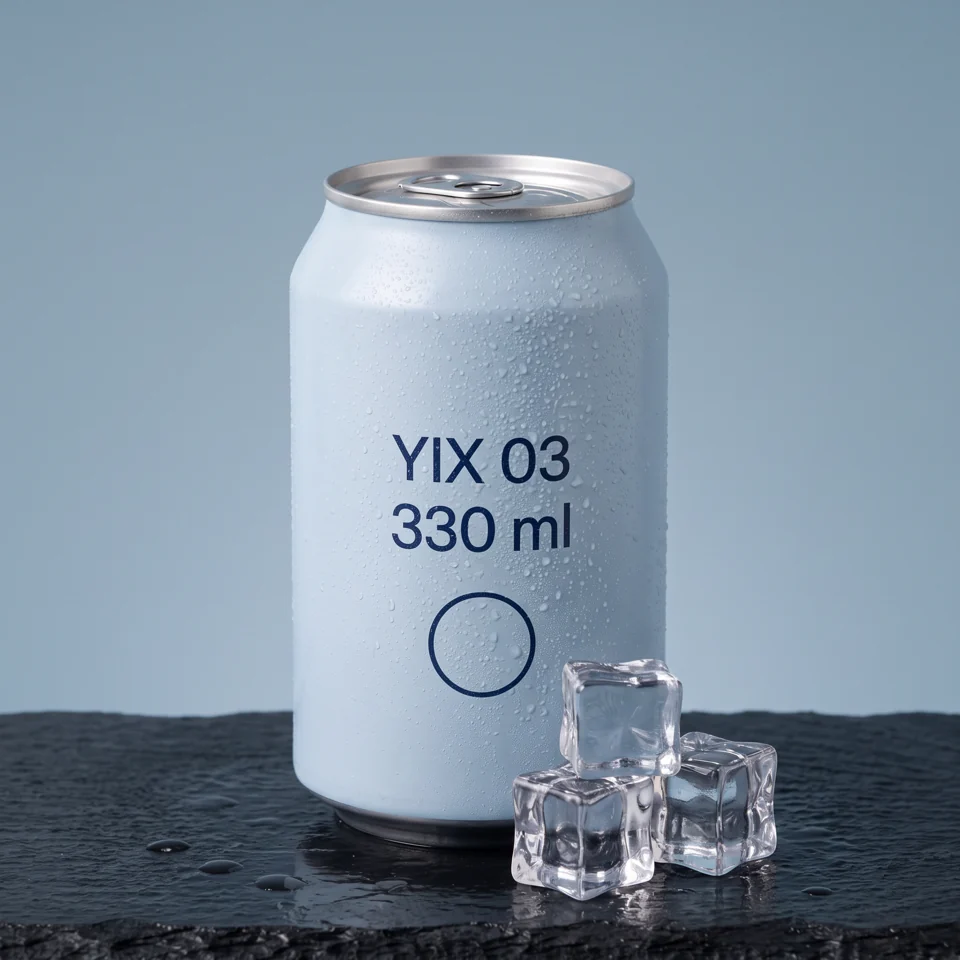
Place the supplied beverage container upright on dark wet slate. A few stationary clear ice cubes sit beside the base, below the front label. Cool blue-grey seamless backdrop, large soft front light and clean edge light. Fine condensation on unprinted areas only; keep the full front branding unobstructed. Eye-level commercial drink photography, crisp material detail and a believable contact shadow. Preserve the actual container and contents. A still scene with no splash, pouring, fruit, hands or extra containers.
冰塊放在標籤下方,冷凝水避開印刷區域。檢查時別隻看正面圖案,也要看拉環和罐口。水花越複雜,越容易遮擋商品;第一張先做乾淨的靜態構圖,更容易判斷包裝有沒有變化。
先準備一張看得清包裝的參考圖
用正面照片,完整拍下瓶蓋、底部和外輪廓。手機也能拍,重點是畫面清晰、標籤沒有被反光擋住。可以把商品放在窗邊的穩定檯面上,讓光從側面照進來。Shopify 的商品攝影指南有這類布光方法的說明。
工具支援 JPEG、PNG、WebP,檔案不超過 10 MB。生成前先選比例:商品卡片可以用 1:1,豎版素材用 9:16,橫幅素材用 16:9。準備後續做影片時,商品四周尤其要留空間。
這篇教學的參考圖是 AI 生成的虛構 YIX 包裝,用來演示流程,並非客戶商品實拍,也不代表所有真實包裝都能準確重現。
AI 商品照提示詞先固定商品,再改變場景
每套內建圖片提示詞都要求保留商品輪廓、比例、材質、瓶蓋或泵頭,以及標籤位置和文字;只替換背景與承託面,不憑空補出看不見的背面。
以下是各個內建圖片提示詞的英文開頭,可直接複製:
Create one realistic commercial product photograph using the supplied reference image as the sole product identity source.

Preserve the exact visible product: silhouette, proportions, packaging color, material, cap or pump, logo placement and all visible printed text. Use the original label as visual evidence; do not redesign or invent branding. Keep the original front-facing angle and make no attempt to invent the hidden back side.
這些要求不能保證逐字一致。參考圖裡看不清的容量數字,應該重新拍清楚,不要指望多寫幾句就能還原。編輯 AI 商品照提示詞時,保留這部分約束,優先調整後面的場景描述。
自己改提示詞,效果可能與範例不同
展開「查看或編輯提示詞」,就能修改圖片提示詞和影片動作提示詞,並分別恢復範本。一次先改一個地方,例如背景顏色,再看結果是否符合預期。
AI 商品照提示詞改過以後,生成結果可能偏離範例;即使用原範本,不同參考圖也會產生差異。修改圖片提示詞後需要重新生成靜態圖片。只修改影片動作提示詞,可以繼續使用已經檢查過的圖片。
檢查靜態圖片,再決定是否做影片
案例圖片使用 Nano Banana 2 的 2K 設定,目前每張 70 點。再在影片產生器裡用 Seedance 1.5 Pro 生成一段 720p、無聲的 5 秒影片,需要 100 點;一張圖加一段影片合計 170 點。切換模型會改變報價,重新生成也會再次消耗點數,以按鈕旁顯示的金額為準。查看點數方案。
放大對照原圖,讀一遍標籤小字,檢查輪廓和道具,再勾選確認。好看的背景不能補救寫錯的容量或變形的泵頭。把 AI 商品照提示詞用在商業素材裡,這一步值得花時間。
Product Studio 的影片步驟可以選擇相容模型,片長固定為 5 秒。我們的保養品範例裡,背景植物運動比預期明顯;飲料影片後半段推進較近,出現了商品裁切。工具頁的真實案例保留了這些結果和說明。釋出前看完整段影片,尤其留意最後一幀。
準備好參考圖後,開啟 Product Studio,挑最接近商品的場景開始。先用場景提示詞做一張靜態圖片,對照實物檢查,再決定要不要繼續做影片。
用參考圖寫商品攝影提示詞
有想重現的攝影風格?先用 圖片轉提示詞 分析參考圖,再看這篇 三個模型的商品攝影實操對比。裡面保留了真實提取的提示詞、Nano Banana 2、FLUX.2 Pro 和 Seedream 5 Lite 的實際結果,以及一次有記錄的構圖調整。